
I got an electronic kit just in time for my birthday so in this project let’s
my birthday so in this project let’s
my birthday so in this project let’s open it up and explore some of the
open it up and explore some of the
open it up and explore some of the things we can do with little bits to
things we can do with little bits to
things we can do with little bits to start this project I’m using the cloud
start this project I’m using the cloud
start this project I’m using the cloud bit starter kit and a little bit ‘space
bit starter kit and a little bit ‘space
bit starter kit and a little bit ‘space kit opening it up you can see all kinds
kit opening it up you can see all kinds
kit opening it up you can see all kinds of sensors switches and motors including
of sensors switches and motors including
of sensors switches and motors including this little power module that hooks to a
this little power module that hooks to a
this little power module that hooks to a USB cable or a 9-volt battery for power
USB cable or a 9-volt battery for power
USB cable or a 9-volt battery for power each little module has magnets built
each little module has magnets built
each little module has magnets built into the end so you can’t connect them
into the end so you can’t connect them
into the end so you can’t connect them the wrong way instead they click
the wrong way instead they click
the wrong way instead they click themselves into position for you making
themselves into position for you making
themselves into position for you making simple circuit building a snap now if we
simple circuit building a snap now if we
simple circuit building a snap now if we connect an LED to the end of the button
connect an LED to the end of the button
connect an LED to the end of the button module you can see that in less than 5
module you can see that in less than 5
module you can see that in less than 5 seconds we’ve made a flashlight that
seconds we’ve made a flashlight that
seconds we’ve made a flashlight that works each time we press the button if
works each time we press the button if
works each time we press the button if we switch out the button with the sound
we switch out the button with the sound
we switch out the button with the sound trigger module we can turn on the light
trigger module we can turn on the light
trigger module we can turn on the light with a snap or a clap alright let’s take
with a snap or a clap alright let’s take
with a snap or a clap alright let’s take this to the next level with the cloud
this to the next level with the cloud
this to the next level with the cloud bit module this little piece snaps just
bit module this little piece snaps just
bit module this little piece snaps just about anything to the internet and
about anything to the internet and
about anything to the internet and you’ll see how it works in just a second
you’ll see how it works in just a second
you’ll see how it works in just a second now if we bring in a remote trigger and
now if we bring in a remote trigger and
now if we bring in a remote trigger and this owl puppet I found laying in the
this owl puppet I found laying in the
this owl puppet I found laying in the kid’s playroom we can build a secret
kid’s playroom we can build a secret
kid’s playroom we can build a secret circuit to monitor the kids
circuit to monitor the kids
circuit to monitor the kids first off let’s cut a small hole in the
first off let’s cut a small hole in the
first off let’s cut a small hole in the feathers just big enough to expose the
feathers just big enough to expose the
feathers just big enough to expose the remote sensor this little device is
remote sensor this little device is
remote sensor this little device is going to let us know when someone’s
going to let us know when someone’s
going to let us know when someone’s using a remote control so let’s snap
using a remote control so let’s snap
using a remote control so let’s snap some wires to either side of the sensor
some wires to either side of the sensor
some wires to either side of the sensor then snap it to the cloud bit module
then snap it to the cloud bit module
then snap it to the cloud bit module making this circuit Wi-Fi compatible I
making this circuit Wi-Fi compatible I
making this circuit Wi-Fi compatible I chose to snap my circuit to a mounting
chose to snap my circuit to a mounting
chose to snap my circuit to a mounting board for convenience and added a little
board for convenience and added a little
board for convenience and added a little bit of duct tape to keep the 9-volt
bit of duct tape to keep the 9-volt
bit of duct tape to keep the 9-volt battery beside the circuit our remote
battery beside the circuit our remote
battery beside the circuit our remote detector circuit is complete and now all
detector circuit is complete and now all
detector circuit is complete and now all we have to do is hide it you can see the
we have to do is hide it you can see the
we have to do is hide it you can see the sensor hides pretty well on the forehead
sensor hides pretty well on the forehead
sensor hides pretty well on the forehead and to get it all working all we need to
and to get it all working all we need to
and to get it all working all we need to do is throw the power switch all right
do is throw the power switch all right
do is throw the power switch all right let’s go ahead and tuck everything
let’s go ahead and tuck everything
let’s go ahead and tuck everything inside the puppet so it’s snug and
inside the puppet so it’s snug and
inside the puppet so it’s snug and secure and completely concealed now I
secure and completely concealed now I
secure and completely concealed now I set this one beside the TV in our kids
set this one beside the TV in our kids
set this one beside the TV in our kids playroom because our kids are in the
playroom because our kids are in the
playroom because our kids are in the habit of sneaking up to watch TV after
habit of sneaking up to watch TV after
habit of sneaking up to watch TV after we’ve gone to bed the difference now is
we’ve gone to bed the difference now is
we’ve gone to bed the difference now is that when they press any button on the
that when they press any button on the
that when they press any button on the remote the sensor in the puppet triggers
remote the sensor in the puppet triggers
remote the sensor in the puppet triggers a circuit and sends a text message to my
a circuit and sends a text message to my
a circuit and sends a text message to my phone letting us know that some little
phone letting us know that some little
phone letting us know that some little body is watching TV I also found these
body is watching TV I also found these
body is watching TV I also found these could be used to detect a thief
could be used to detect a thief
could be used to detect a thief I made this circuit in less than 10
I made this circuit in less than 10
I made this circuit in less than 10 seconds by replacing the remote sensor
seconds by replacing the remote sensor
seconds by replacing the remote sensor with a light sensor and an LED when the
with a light sensor and an LED when the
with a light sensor and an LED when the light sensor is covered you can see the
light sensor is covered you can see the
light sensor is covered you can see the circuit goes into standby mode the
circuit goes into standby mode the
circuit goes into standby mode the reactivates when light hits it again
reactivates when light hits it again
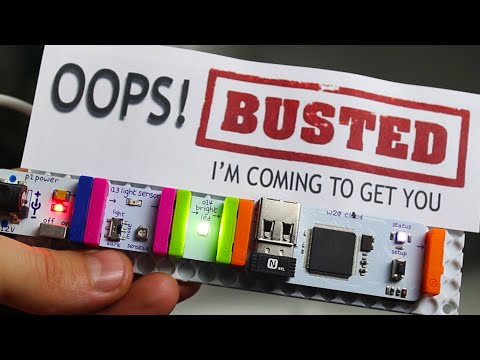
reactivates when light hits it again I tried taping this inside my safe along
I tried taping this inside my safe along
I tried taping this inside my safe along with a little note for any would-be
with a little note for any would-be
with a little note for any would-be intruder and if you watch carefully you
intruder and if you watch carefully you
intruder and if you watch carefully you can see that when the door closes the
can see that when the door closes the
can see that when the door closes the LED shuts off and the circuit switches
LED shuts off and the circuit switches
LED shuts off and the circuit switches to standby now if anyone gets inside the
to standby now if anyone gets inside the
to standby now if anyone gets inside the safe it lights up scaring away a
safe it lights up scaring away a
safe it lights up scaring away a potential thief and sending an alert
potential thief and sending an alert
potential thief and sending an alert that someone just opened your safe now
that someone just opened your safe now
that someone just opened your safe now there are over a million circuit
there are over a million circuit
there are over a million circuit combinations that you could make with
combinations that you could make with
combinations that you could make with these snap together circuits and for one
these snap together circuits and for one
these snap together circuits and for one final project I tried connecting a
final project I tried connecting a
final project I tried connecting a little bit’s AC switch in line with a
little bit’s AC switch in line with a
little bit’s AC switch in line with a small space heater the circuit uses an
small space heater the circuit uses an
small space heater the circuit uses an infrared transmitter to activate the
infrared transmitter to activate the
infrared transmitter to activate the switch which can be done remotely by
switch which can be done remotely by
switch which can be done remotely by setting a few simple commands on if calm
setting a few simple commands on if calm
setting a few simple commands on if calm so now instead of heating an empty house
so now instead of heating an empty house
so now instead of heating an empty house all day simply send a text message on
all day simply send a text message on
all day simply send a text message on your way home from work to turn on the
your way home from work to turn on the
your way home from work to turn on the heater this way you’ll save energy and
heater this way you’ll save energy and
heater this way you’ll save energy and still come home to a nice warm room well
still come home to a nice warm room well
still come home to a nice warm room well there are a few projects I tried with a
there are a few projects I tried with a
there are a few projects I tried with a little bit’s electronics kit to solve
little bit’s electronics kit to solve
little bit’s electronics kit to solve some everyday challenges and learn more
some everyday challenges and learn more
some everyday challenges and learn more about electronics in the process well
about electronics in the process well
about electronics in the process well that’s it for now if you liked this
that’s it for now if you liked this
that’s it for now if you liked this project perhaps you’ll like some others
project perhaps you’ll like some others
project perhaps you’ll like some others check them out at the king of random
check them out at the king of random
check them out at the king of random calm it’s time to give the gift of geek
calm it’s time to give the gift of geek
calm it’s time to give the gift of geek hey guys I’m sure you can tell this
hey guys I’m sure you can tell this
hey guys I’m sure you can tell this video was in collaboration with little
video was in collaboration with little
video was in collaboration with little bits and I asked them it’s and let me do
bits and I asked them it’s and let me do
bits and I asked them it’s and let me do a contest so I give away a kit for free
a contest so I give away a kit for free
a contest so I give away a kit for free and they agreed so click here to enter
and they agreed so click here to enter
and they agreed so click here to enter your name for the drawing and in about a
your name for the drawing and in about a
your name for the drawing and in about a week I’ll randomly choose a winner and
week I’ll randomly choose a winner and
week I’ll randomly choose a winner and email you to see which kits you want
email you to see which kits you want
email you to see which kits you want they’ve got a deluxe kit if you’re a kid
they’ve got a deluxe kit if you’re a kid
they’ve got a deluxe kit if you’re a kid hobbyist or tinkerer synth kits for
hobbyist or tinkerer synth kits for
hobbyist or tinkerer synth kits for creating music Arduino coding kits for
creating music Arduino coding kits for
creating music Arduino coding kits for aspiring programmers and even smart home
aspiring programmers and even smart home
aspiring programmers and even smart home kits that connect your appliances to the
kits that connect your appliances to the
kits that connect your appliances to the Internet there’s basically a kit you
Internet there’s basically a kit you
Internet there’s basically a kit you could get for anyone including yourself
could get for anyone including yourself
could get for anyone including yourself and if you need any help finding the
and if you need any help finding the
and if you need any help finding the right gift for friends or family check
right gift for friends or family check
right gift for friends or family check out the Holiday Gift Guide at little
out the Holiday Gift Guide at little
out the Holiday Gift Guide at little bits comm you can also use the promo
bits comm you can also use the promo
bits comm you can also use the promo code the king of random to get $20 off a
code the king of random to get $20 off a
code the king of random to get $20 off a qualifying order and free shipping in
qualifying order and free shipping in
qualifying order and free shipping in the US thanks for watching and if you
the US thanks for watching and if you
the US thanks for watching and if you want to check out some more electronic
want to check out some more electronic
want to check out some more electronic related project videos take a look at
related project videos take a look at
related project videos take a look at the ones over here otherwise I’ll see
the ones over here otherwise I’ll see
the ones over here otherwise I’ll see you in the next project video bye
”
Be First to Comment